


Most SaaS vendors connect to your tenant with one multitenant app and one credential, shared by every customer. Kelvin Tegelaar, founder of CyberDrain and creator of CIPP (used by well over 10,000 MSPs), sees it from both sides, and his verdict is blunt: “This app is dangerous, period.”
Recorded on 14 October 2026, one day before the ConnectWise Cloud Backup app’s credential was used to sign in to customer tenants (173 confirmed by Huntress).
Key takeaways
The risk: one app, every tenant
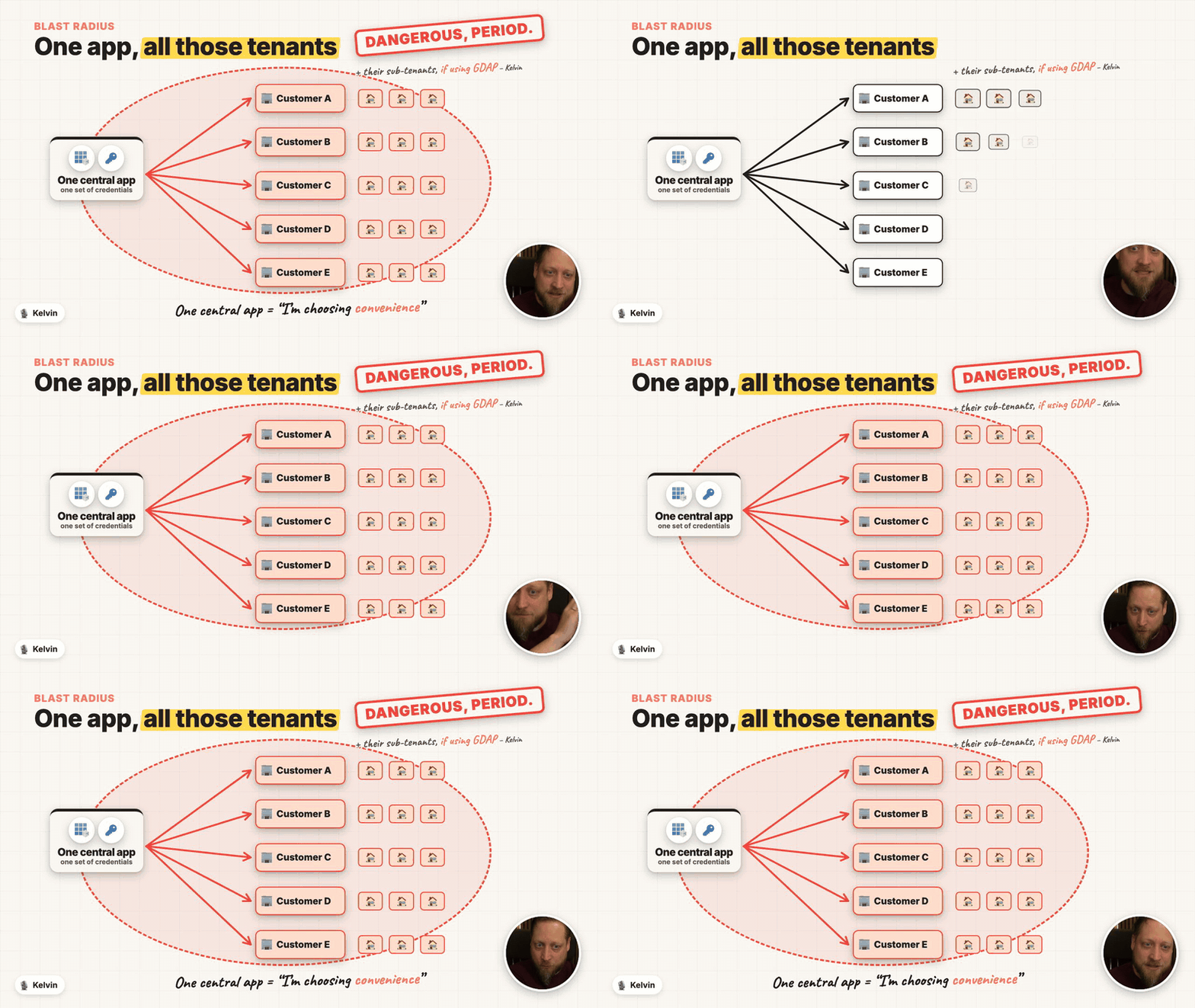
One app registration, a service principal in every tenant. The credentials sit on the vendor’s app registration, so one leaked secret or certificate works in every tenant that consented, with whatever application permissions you granted. For MSP tools, GDAP widens it to every customer behind the partner.
You can’t put Conditional Access on a vendor’s app. Conditional Access for workload identities covers single-tenant apps only. Watch vendor apps’ sign-ins, ask vendors how they protect their credentials, and know where the Enabled for users to sign-in? switch is so you can disable an app fast.
Fix the credentials
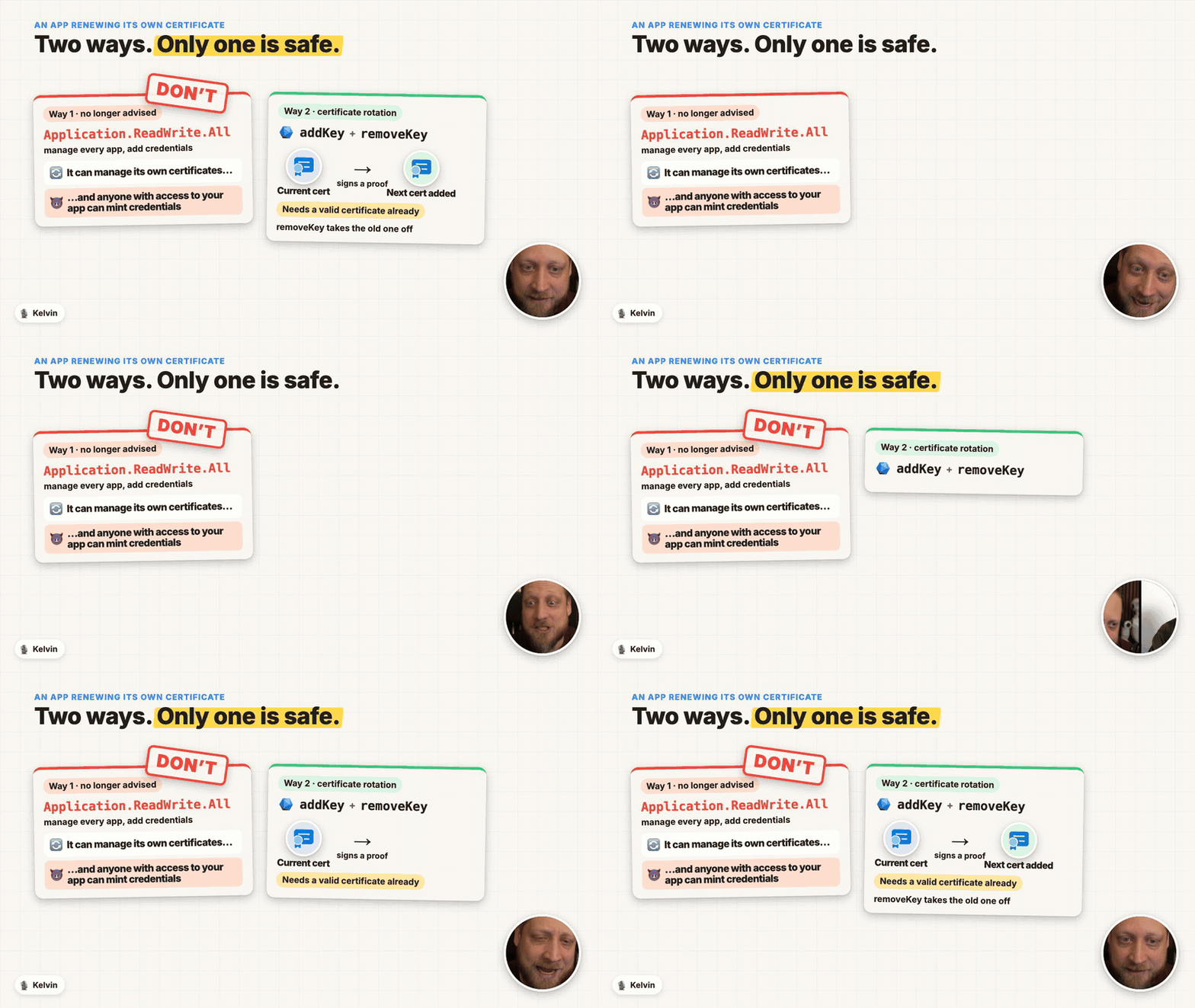
Retire client secrets; let certificates rotate themselves. Prefer managed identity or federation; otherwise use short-lived certificates. CIPP’s last 30 days and are replaced every two weeks with Microsoft Graph
addKey/removeKey, not by granting the appApplication.ReadWrite.All.Turn on app management policies. Block new client secrets and cap credential lifetimes. The tenant default policy is off until you enable it.
Lock your app’s service principals. Builders: keep app instance property lock on (the default for new apps since June 2026), so customer tenants can’t add their own credentials to your app.
Fix the architecture
Build one app per customer tenant. A leak in tenant A then stays in tenant A. It costs some engineering; one central app is “choosing convenience”, which is fine only if you choose it knowingly.
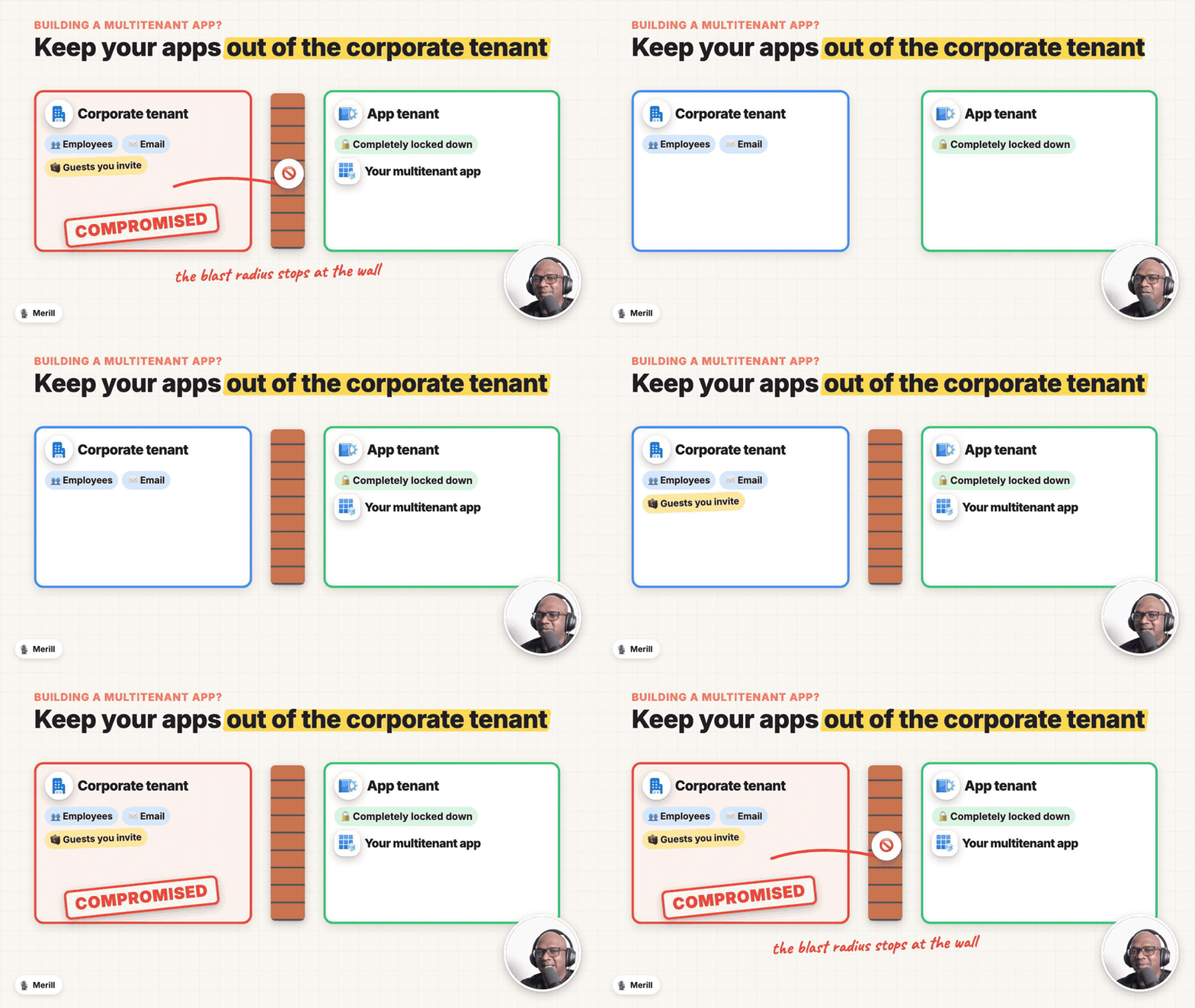
Keep the apps you ship out of your corporate tenant. Separate tenants for corporate, Azure and the apps you publish, all secured to the same baseline. Decide early: an app registration can’t move between tenants.
Watch the full conversation for how Kelvin built CIPP out of spite, the vendor mistakes he sees most, and why a standard pen test won’t find any of this.
Sponsored by:

Know what’s in your tenant, and keep watching it
Every risk above lives in your own tenant: multitenant vendor apps with powerful permissions, client secrets and certificates that live for years, and app management policies nobody turned on. Maester, the free, open-source security test framework for Microsoft 365, finds them, with tests for long-lived app certificates, expiring credentials, privileged permissions nobody uses and app management restrictions.
Maester Cloud keeps watching after the first scan:
Continuous monitoring: scheduled runs, each one diffed against the last, with drift alerts sent from your own Microsoft 365 mailbox.
Assign each failed test to its owner and link a ticket.
Track the work until it’s fixed: new failures, fixes since the last run and accepted risks, each pinned to a date and run ID.
Every tenant in one place, switching between customers without signing in again. Unlimited users and tenants.
Self-hosted in your own Azure subscription for $99 a month or $1,188 a year, or through Azure Marketplace on your Azure invoice.
Subscribe with your favorite podcast player or watch on YouTube
About Kelvin Tegelaar
Kelvin Tegelaar is the founder of CyberDrain and the creator of CIPP, the CyberDrain Improved Partner Portal, an open-source, sponsor-funded tool that MSPs use to manage their customers’ Microsoft 365 tenants. He owns and is CTO of Lime Networks, an MSP in the Netherlands, and has been a Microsoft MVP for eight years. A system administrator rather than a developer by trade, he built CIPP in PowerShell and has blogged at CyberDrain.com for years about automating Microsoft 365 for MSPs.
GitHub - https://github.com/KelvinTegelaar
CyberDrain - cyberdrain.com
Related Links
From the conversation:
Kelvin’s “accidental SaaS” blog post (mentioned at 02:25) - Referenced in the episode, but the blog post could not be found.
Huntress: Never Just One Termite, 6 months of researching OAuth application attacks (rogue apps) (mentioned at 24:28) - https://www.huntress.com/blog/never-just-one-termite-6-months-of-researching-oauth-application-attacks
Huntress: Traitorware, how hackers abuse legitimate apps to hijack Microsoft 365 - https://www.huntress.com/resources/traitorware-how-hackers-abuse-legitimate-apps-to-hijack-microsoft-365
CIPP - cipp.app
CIPP documentation - docs.cipp.app
CIPP on GitHub - https://github.com/KelvinTegelaar/CIPP
CyberDrain - cyberdrain.com
Automating with PowerShell: making stolen tokens useless with Global Secure Access, by Kelvin Tegelaar - https://cyberdrain.com/automating-with-powershell-making-stolen-tokens-useless-with-global-secure-access/
Huntress: vendor credential enables unauthorized access (the ConnectWise Cloud Backup incident) - https://www.huntress.com/blog/vendor-credential-enables-unauthorized-access
Multitenant apps and permissions:
Application and service principal objects in Microsoft Entra ID (mentioned at 17:05) - https://learn.microsoft.com/en-us/entra/identity-platform/app-objects-and-service-principals
allowedTenantsAudience (restrict a multitenant app to specific tenants, Graph beta) (mentioned at 17:18) - https://learn.microsoft.com/en-us/graph/api/resources/allowedtenantsaudience?view=graph-rest-beta
How to configure app instance property lock (mentioned at 18:09) - https://learn.microsoft.com/en-us/entra/identity-platform/howto-configure-app-instance-property-locks
Microsoft Graph permission types: delegated and application (mentioned at 18:48) - https://learn.microsoft.com/en-us/graph/permissions-overview
Microsoft Graph permissions reference - https://learn.microsoft.com/en-us/graph/permissions-reference
GDAP and the Secure Application Model (mentioned at 16:32) - https://learn.microsoft.com/en-us/partner-center/developer/gdap-and-secure-application-model
Credentials and rotation:
Add and manage application credentials (mentioned at 21:00) - https://learn.microsoft.com/en-us/entra/identity-platform/how-to-add-credentials
application: addKey (mentioned at 31:01) - https://learn.microsoft.com/en-us/graph/api/application-addkey?view=graph-rest-1.0
Generate proof-of-possession tokens for rolling keys - https://learn.microsoft.com/en-us/graph/application-rollkey-prooftoken
Configure app management policies (mentioned at 32:23) - https://learn.microsoft.com/en-us/entra/identity/enterprise-apps/configure-app-management-policies
Managed identities and secretless authentication across tenants (mentioned at 28:21) - https://learn.microsoft.com/en-us/entra/identity/managed-identities-azure-resources/secretless-authentication
Configure an app to trust a managed identity - https://learn.microsoft.com/en-us/entra/workload-id/workload-identity-federation-config-app-trust-managed-identity
Monitoring and response:
Conditional Access for workload identities (mentioned at 27:38) - https://learn.microsoft.com/en-us/entra/identity/conditional-access/workload-identity
Disable user sign-in for an application (mentioned at 26:26) - https://learn.microsoft.com/en-us/entra/identity/enterprise-apps/disable-user-sign-in-portal
Tenants:
Secure Future Initiative: eliminate identity lateral movement (mentioned at 34:32) - https://learn.microsoft.com/en-us/security/zero-trust/sfi/eliminate-identity-lateral-movement
Microsoft actions following attack by nation state actor Midnight Blizzard (mentioned at 34:32) - https://www.microsoft.com/en-us/msrc/blog/2024/01/microsoft-actions-following-attack-by-nation-state-actor-midnight-blizzard
Workforce and external tenant configurations (Microsoft Entra External ID) (mentioned at 37:17) - https://learn.microsoft.com/en-us/entra/external-id/tenant-configurations
Related Entra.Chat Episodes
Stolen Tokens, Agents and Universal CAE: What Global Secure Access Adds to Entra ID (mentioned at 35:27) - https://entra.news/p/stolen-tokens-agents-and-universal
Stop the Bleeding: Cleaning Up Apps, Secrets and Consent in Microsoft Entra - https://entra.news/p/stop-the-bleeding-cleaning-up-apps
Your AI Coding Agent Is Creating Secrets You Don’t Know About - https://entra.news/p/your-ai-coding-agent-is-creating
Chapters
00:00 Cold open
01:20 Intro
01:38 Meet Kelvin Tegelaar
04:17 Spite-driven development
07:09 “I’ll do it myself”
09:23 You’ve started a business
11:42 Why CIPP stays PowerShell
13:30 What is an ISV?
15:46 One app for every customer
18:46 When the secret leaks
20:23 Secrets that outlive you
21:47 One app is dangerous, period
24:26 Rogue apps
26:46 Sponsor: Maester Cloud
27:34 Conditional Access for workload identities
28:25 Certificates that rotate themselves
32:05 Lock it down with app policies
33:54 Split your tenants
36:47 How many tenants?
38:17 Build the foundation first
40:16 Pen tests miss the app
41:32 Closing thoughts
Podcast Apps
Entra.Chat - entra.chat
Apple Podcast - https://entra.chat/apple
YouTube - https://entra.chat/youtube
Spotify - https://entra.chat/spotify
Overcast - https://entra.chat/overcast
Pocketcast - https://entra.chat/pocketcast
Others - https://entra.chat/rss
Merill’s socials
YouTube - youtube.com/@merillx
LinkedIn - linkedin.com/in/merill
Twitter - twitter.com/merill
TikTok - tiktok.com/@merillf
Bluesky - bsky.app/profile/merill.net
Mastodon - infosec.exchange/@merill
Threads - threads.net/@merillf
GitHub - github.com/merill


