


👋 Hi, Merill and Joshua here with this week’s roundup of the latest news on Microsoft Entra from around the globe 🌍.
Big news this week. Entra.News now has five siblings.
We’ve launched Admin.News, a network of newsletters for Microsoft admins. Each one is run by someone I’ve learned a ton from over the years:
Purview News with Ewelina Paczkowska
Defender News with Fabian Bader
Intune News with Andrew Taylor
AD News with David Horak
Microsoft AI News with Joanne Hayek
Huge thanks to all of them for jumping in. They’re doing the hard work of reading everything so you don’t have to.
Pick the ones you care about and subscribe at https://admin.news

This week’s Entra.Chat is a Workplace Ninjas US special. Four of the event’s speakers join me to talk free AI agents, the E7 bill and AD vs Entra. Watch it, then grab a ticket and meet me and the community in person!
Free AI Agents, the E7 Bill and AD vs Entra: The Workplace Ninjas US Special

AI agents are arriving in every Microsoft 365 tenant, and the questions admins ask first are what they cost to run and what it costs to secure them. In this Workplace Ninjas US special, four of the event’s speakers answer from the field: Jon Towles, founder of Workplace Ninjas US, Intune and AI tool builder Ugur Koc, Microsoft 365 security MVP Ru Campbe…
Enjoy!
Sponsored by:
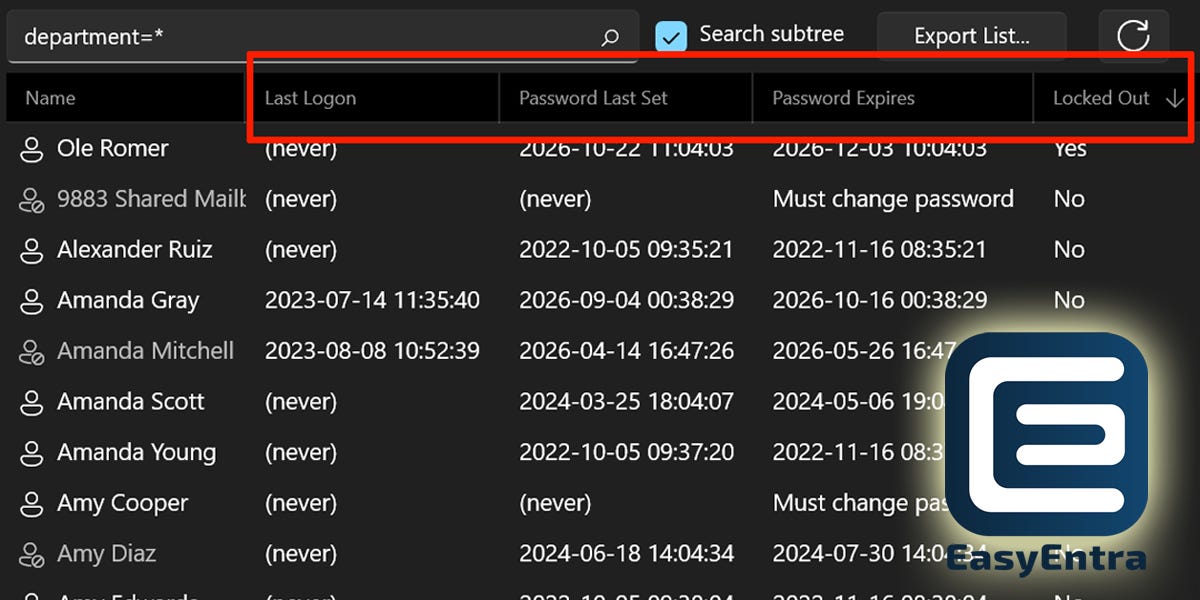
Still using ADUC? Use this free tool instead!
Who’s locked out?
Whose password expires next?
When did this user last log on?EasyEntra puts the answers right in your AD user list with multiple columns you won’t find in the standard Active Directory Users & Computers view.
Sort by Locked Out to bring affected accounts to the top, or scan password expiry dates across users. No PowerShell script to write. No account properties to open.
EasyEntra is completely free for on-premises AD management, installs in a minute, and carries no infrastructure or security changes.
⚡️ Microsoft
🏆 General Availability
What’s new in Microsoft Entra: November 2026 • Yina Arenas
🔥 Public Preview
Scale access controls with Microsoft Entra Conditional Access policy plans • Swaroop Krishnamurthy
📖 Read
Global Secure Access: Private Access and Internet Access in one offering • Yair Tor
Microsoft named a Leader in the 2026 Gartner® Magic Quadrant™ for AI Agent Management Platforms • Nadim Abdo
Threat actors use agentic AI tooling to find and abuse exposed secrets • Microsoft Threat Intelligence and Microsoft Security Research
ARTEX abuse expands as cybercriminals target financial sector • Microsoft Threat Intelligence
What’s new in Microsoft Security: November 2026 • Alym Rayani
Catch Microsoft Entra at Ignite 2026 • Ngozi Nwoko
📒 Tenant Configuration
New investments to reduce on-premises security risk • Paul Lorimer
🗣️ Message Center
Sponsored by:

Know what’s in your tenant, and keep watching it
Every risk above lives in your own tenant: multitenant vendor apps with powerful permissions, client secrets and certificates that live for years, and app management policies nobody turned on. Maester, the free, open-source security test framework for Microsoft 365, finds them, with tests for long-lived app certificates, expiring credentials, privileged permissions nobody uses and app management restrictions.
Maester Cloud keeps watching after the first scan:
Continuous monitoring: scheduled runs, each one diffed against the last, with drift alerts sent from your own Microsoft 365 mailbox.
Assign each failed test to its owner and link a ticket.
Track the work until it’s fixed: new failures, fixes since the last run and accepted risks, each pinned to a date and run ID.
Every tenant in one place, switching between customers without signing in again. Unlimited users and tenants.
Self-hosted in your own Azure subscription for $99 a month or $1,188 a year, or through Azure Marketplace on your Azure invoice.
From the community…

🚀 Most popular posts from last week
🥇 You scoped an app to 50 mailboxes. It can still read all of them. • Darius Frank
🥈 PIM for Azure Roles Gotcha • Jay Kerai
🥉 Optimizations for passkey registration experience you might have missed • Jan Bakker
☀️ Learn
🧰 Workload ID
Identity Threat Protection in Microsoft 365 - Part 2: Your Tenant Has More Identities Than Employees • Derek M.
Microsoft USER (User Security Evaluation Reporter) Rearchitected for Entra ID • Darren Robinson
Power Platform Service Connections: Client Secret, Managed Identity or Workload Identity Federation? • Zsolt Zombik
⛑️ ID Protection
A new Entra risk detection needs a policy to act on it • Stephen Bennett
👮♂️ ID Governance
Identity Governance: Why Access Audits Turn Into Investigations • Sandra Saluti
Entra MemberOf replacement heads behind Governance paywall • Daniel Bradley
Cleanup Inactive Agent IDs with Lifecycle Workflows in Microsoft Entra • Kanaga
🌐 Private Access & Internet Access (GSA)
TLS Inspection and Custom Block Pages • Andy Kemp
📦 Apps
Authentication
Passkeys in Microsoft Entra ID: Phishing-Resistant MFA, End to End • Masood Raza
Entra ID Allows Users to Change Passwords Without Knowing Their Old Password • Tony Redmond
How to secure passkey registration in Entra ID • Jan Bakker
Microsoft 365 Passkeys Not Working? 6 Fixes • Nick Ross
🤖 DevOps & PowerShell
Passkey Provider AAGUIDs PowerShell Module Now Refreshes Automatically Every Week • Darren Robinson
Installing all Microsoft.Graph module dependencies when your internet connection sucks • Aaron Guilmette
🚦 Conditional Access
Conditional Access Policy Plans in Preview: What I Found Testing Them Against Live Policies • Derek M.
Microsoft Entra Conditional Access Policy Plans: What Problem Do They Actually Solve? • Kenneth van Surksum
Conditional Access Policy Plans - A First Look: Dub or Flop? • Sebastian Flæng Markdanner
Microsoft adds hard deletion protection for Entra ID • Daniel Bradley
Intune compliance to Conditional Access, end to end • Jorge Suarez
Conditional Access App Control not working: where it breaks • Golam Rafi Badhon
📺 Microsoft Just Changed Conditional Access Forever! • Peter Rising
🖥️ Devices
Free AI Agents, the E7 Bill and AD vs Entra: The Workplace Ninjas US Special • Merill Fernando
How to set up SMS or voice with your own telecom provider in Microsoft Entra • Jan Bakker
Fixing Hybrid Join Sync Failures: Domain-Joined PCs Not Appearing in Microsoft Entra ID • Kaveendra Dhilhan
🏙️ External ID - Guests & Multi-Tenant Organizations
AADSTS50020: which tenant the account is in, and how to fix it • Golam Rafi Badhon
🥷 Security
An AI agent can self-activate a privileged Entra role. No human, no MFA. • Darius Frank
Security Testing for Everyone • Paul Schnackenburg
📒 Tenant Configuration
Exploring Defender XDR tenant governance • Nicola Suter
📺 Migrating Users From Hybrid AD to Microsoft Entra Cloud Native • Andy Malone
🛍️ External ID - Customers
Using a .NET .http file to do an authentication code flow in Entra External ID (EEID) • Rory Braybrook
A comparison between Azure AD B2C and Entra External ID (EEID) • Rory Braybrook
🔥 Maester
Maester beyond the first scan: making Entra security repeatable • Sven Frank
Maester field notes: AI agents, legacy identities and blueprint drift • Sven Frank

👨🏽💻 Merill’s corner


Want to get featured on Entra.News? → Submit your content 😎
Want us to say nice things about your company? Sponsor entra.news 🤩
Love the newsletter? Tell us 💚❤️💜
🪃 Acknowledgement of Country
Entra.News is created on Wurundjeri land and acknowledges the traditional owners of country throughout Australia, recognising their continuing connection to land, water and community. We pay our respect to them and their cultures and to elders both past and present.