


Microsoft Entra Agent ID Just Went GA Here’s What You Need to Know About Agent Permissions
If you’ve been waiting for the dust to settle on Microsoft Entra Agent ID before diving in, the wait is over. Agent ID hit General Availability on May 1st, and in this episode of Entra Chat, Erin Greenlee, a PM in the the Entra AuthN team joins to break down one of the trickiest parts of the new model: how permissions actually work.
The three-tier model you need to understand
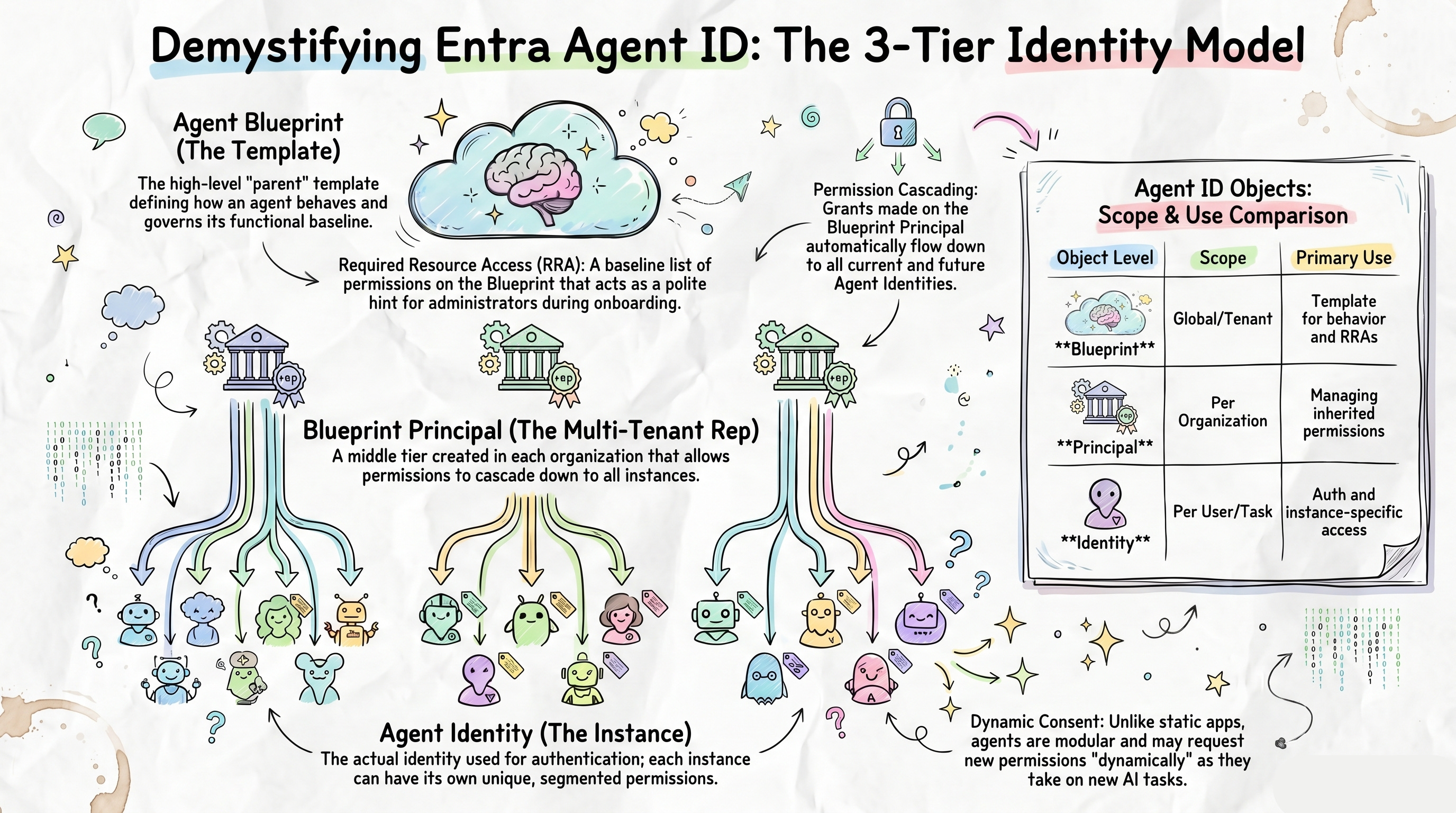
The biggest mental shift with Agent ID is moving from the familiar single app registration model to a three-tier hierarchy. Here’s the short version:
Agent Blueprint → the template for your agent. Think of it as a souped-up app registration that lives in one tenant and defines how the agent behaves. Every agent needs one, even if you’re only ever creating a single instance.
Blueprint Principle → the identity that represents the blueprint inside each tenant it’s deployed to. This is the middle tier, and it has a superpower: permissions granted here cascade down to all current and future agent identity instances automatically.
Agent Identity → the actual running instance of the agent. This is what authenticates, what shows up in your tenant logs, and what can hold its own individual permissions on top of whatever it inherits.
Required Resource Access is a hint, not a grant
One thing that trips people up early: adding permissions to the blueprint’s Required Resource Access (RRA) doesn’t actually grant anything. It’s a signal to admins adopting your agent. A polite list of “here’s what this agent will need to function.” The real grant happens later, either upfront during adoption or dynamically as the agent needs it. Expect agents to lean more on dynamic consent than traditional apps have, since agents evolve and request new permissions as tasks change.
Inheritance only works if you set it up
Permissions granted on the Blueprint Principle will only cascade down to agent identities if the resource app (e.g. Microsoft Graph) is explicitly marked as an inheritable resource on the blueprint. It’s an easy thing to miss, and if you skip it, your Blueprint Principle grants won’t flow through to your instances.
A free tool to visualise all of this
Erin built an interactive web app — using GitHub Copilot, no less — that makes all of the above click visually. It has a no-sign-in tutorial that walks you through the object relationships, a permission matrix view, and even generates the PowerShell or Graph API scripts to apply your configuration in real life. No changes are made to your tenant unless you explicitly ask it to. The source code is being open-sourced too, so you can fork and customise it if you want.
Watch the full episode to see Erin walk through the tool live, including how permission inheritance works in practice and a real-world debugging scenario that inspired the whole thing.
Subscribe with your favorite podcast player or watch on YouTube 👇
About Erin Greenlee
Erin is a member of the Entra AuthN team working on AI and Agent ID at Microsoft. She previously joined Entra Chat to discuss app permissions and consent, and she loves building tools that make complex identity concepts easier to understand.
LinkedIn - https://www.linkedin.com/in/eringreenlee/
Sponsored by:
Find App Access Gaps Before They Break Workflows
In Microsoft Entra ID, small visibility gaps lead to outages and delays. Expired secrets break integrations, while unclear ownership and excessive permissions slow access decisions. Teams still struggle to answer:
Which apps access Microsoft 365 data?
Is that access still justified?
Who owns it?
AppGov Score helps you quickly identify these gaps. ENow App Governance Accelerator then exposes app-specific credential risks, permission issues, and ownership gaps before they disrupt operations.
Start with your AppGov Score, then upgrade to a 7-day free trial to take action.
🔗 Related Links

📗 Chapters
01:11 Agent ID General Availability
04:14 The Agent ID Visualizer Tool
05:35 Defining the Agent Blueprint
08:06 Understanding the Blueprint Principle
10:57 Agent Identity Instances Explained
13:37 Required Resource Access (RRA)
24:07 Inheritable Permissions and Cascading
30:18 Applying Changes with Scripts
Podcast Apps
🎙️ Entra.Chat - https://entra.chat
🎧 Apple Podcast → https://entra.chat/apple
📺 YouTube → https://entra.chat/youtube
📺 Spotify → https://entra.chat/spotify
🎧 Overcast → https://entra.chat/overcast
🎧 Pocketcast → https://entra.chat/pocketcast
🎧 Others → https://entra.chat/rss
Merill’s socials
📺 YouTube → youtube.com/@merillx
👔 LinkedIn → linkedin.com/in/merill
🐤 Twitter → twitter.com/merill
🕺 TikTok → tiktok.com/@merillf
🦋 Bluesky → bsky.app/profile/merill.net
🐘 Mastodon → infosec.exchange/@merill
🧵 Threads → threads.net/@merillf
🤖 GitHub → github.com/merill


